

Invoicing for usage-based plans
Understand how Bolt issues, collects, and enforces invoices for subscriptions billed by usage.
Usage-based plans bill in arrears: at each renewal, Bolt rates the period's metered usage, issues an invoice, and gives the subscriber until the due date to pay. There is no merchant-side collection setting.
This page describes stores that don't use Bolt Cart. On Bolt Cart, every plan, usage-based included, is charged to the saved payment method at renewal. A failed charge leaves the renewal invoice open, retries on your payment recovery schedule, and then pauses the subscription until the invoice is paid.
Invoice lifecycle
An invoice moves through these states:
- Draft, while line items can still change.
- Open, once finalized and sent. The due date comes from the division's Invoice due (days) setting (default 30), or the schedule's
days_until_duefor scheduled invoices. - Paid, when payment covering the balance is recorded. Payments above the balance are accepted and reported back as an overpaid amount.
- Past due, when the due date passes unpaid. Bolt's dunning reminders begin on the Reminder schedule, and the Late fee, if configured, is applied once.
- Uncollectible, if dunning is exhausted and automatic write-off is on.
- Void, if you cancel the invoice. A voided invoice is no longer owed.
Invoices for the division live on the Invoices page: the list shows each invoice's status and balance, and the detail page shows its line items.
Unpaid invoices pause renewal
When a usage-billed subscription has any invoice in past due or uncollectible, Bolt pauses the next renewal instead of placing it. No new period starts and no new usage is rated, so the subscriber's debt does not grow while unpaid.
The pause lifts automatically:
- when every delinquent invoice is paid, or
- when the remaining delinquent invoices are voided (forgiven).
Bolt then reschedules the renewal. While the invoice is past due, you can also unpause the subscription manually from the dashboard; doing so overrides the unpaid-invoice hold, and renewals resume even though the invoice remains unpaid. Once the invoice is uncollectible, manual unpausing is unavailable until the customer pays.
The paused subscription shows the reason unpaid_invoice in its status details, so you can distinguish this hold from a pause you applied yourself.
Division billing settings
The Usage billing tab's settings section holds the division-wide rules for accepting usage and collecting unpaid invoices. On Bolt Cart, this section sets only the usage acceptance window; retries follow your payment recovery settings.
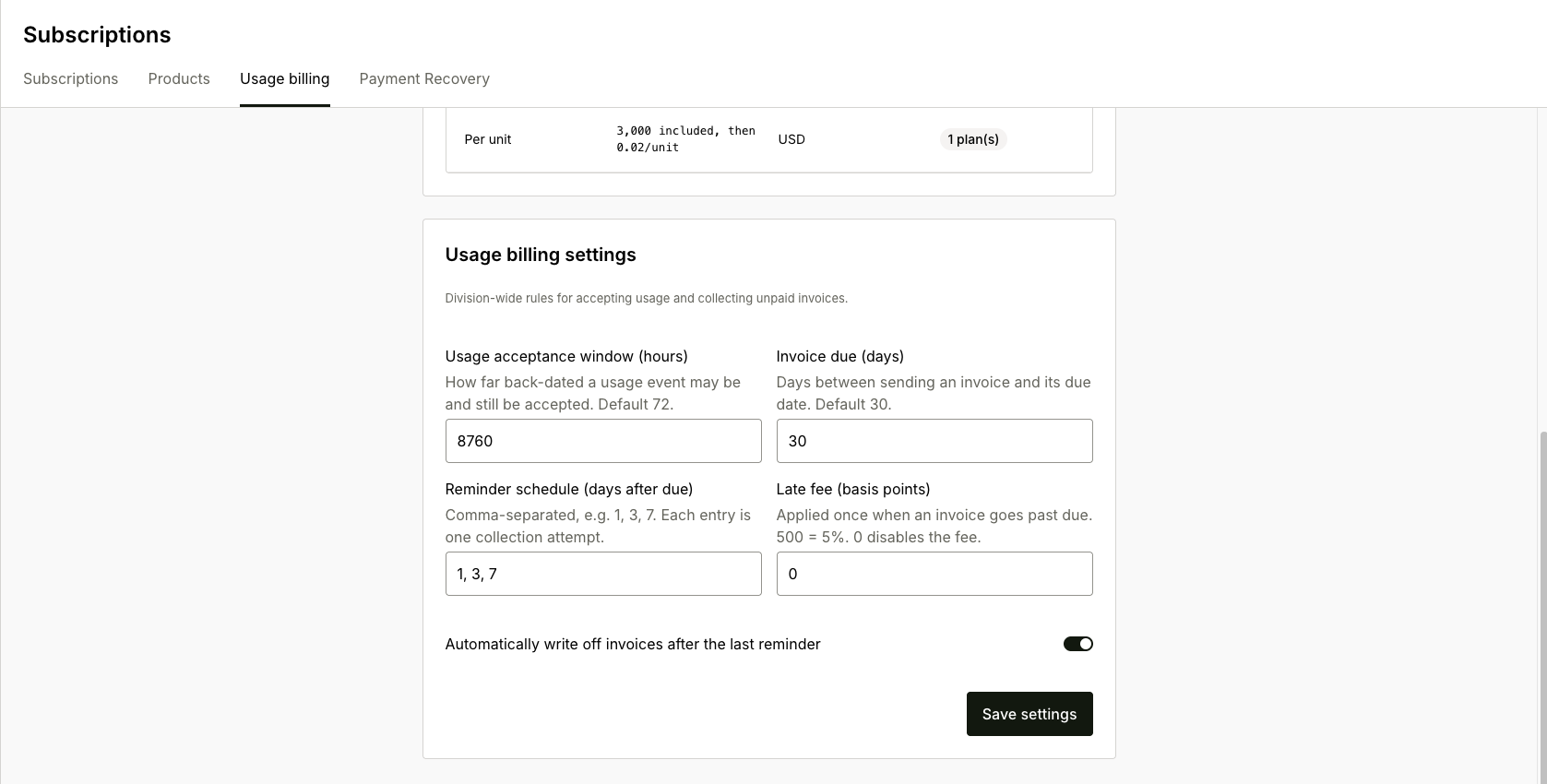
- Usage acceptance window (hours): how far back-dated a usage event may be and still be accepted (default 72). Events older than this are rejected at ingestion.
- Invoice due (days): days between sending an invoice and its due date (default 30).
- Reminder schedule (days after due): comma-separated dunning attempts once an invoice is past due, for example
1, 3, 7. - Late fee (basis points): applied once when an invoice goes past due;
500= 5%,0disables it. - Automatically write off invoices after the last reminder: exhausted dunning marks the invoice uncollectible instead of leaving it past due forever. An uncollectible invoice still pauses renewals until paid or voided.
Invoice templates and schedules
Recurring invoices outside the subscription cycle, for example a fixed monthly platform fee, come from invoice templates and schedules:
- An invoice template defines the reusable document: name, currency, line items (quantity and unit amount), an optional memo, and a default
days_until_due. - An invoice schedule binds a template to a payer with a frequency (for example every 1 month), an optional start, and an end by date or by a total number of cycles, up to 1000. Each run generates one invoice from the template.
A template that schedules still reference cannot be deleted; end the schedules first.