

Steps to Implement Bolt Subscriptions
Subscriptions API implementation guide.
1. Get Keys
- Log in to the sandbox Merchant Dashboard for the sandbox keys these examples use, or the Bolt Merchant Dashboard for production keys. See Environments
- Navigate to Administration → API.
- Copy the following:
- Api Key
- Publishable Key
- The publishable key is a long string of lower and upper case letters and numbers that consists of three sections.
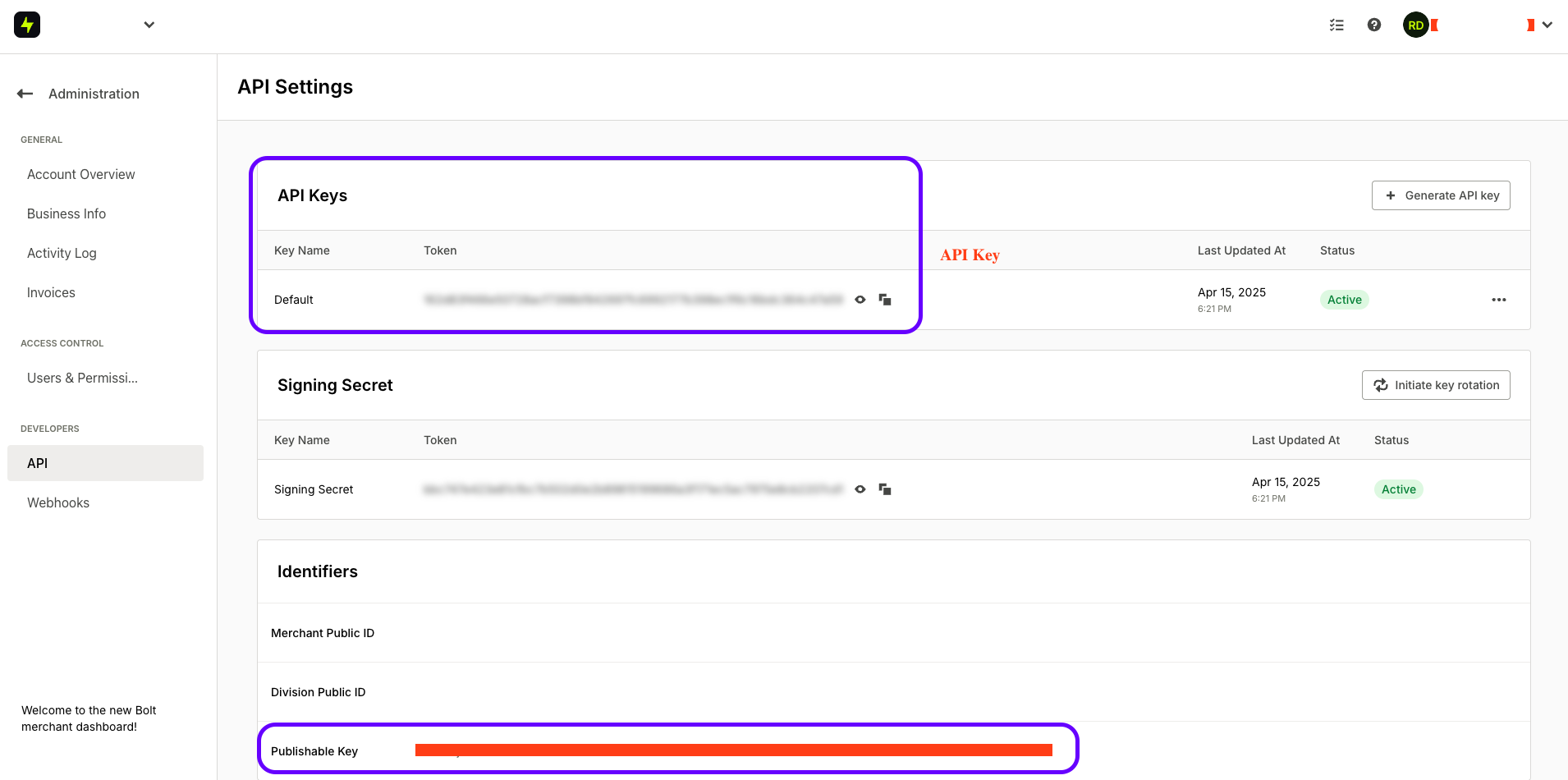
Every endpoint in this guide requires both keys, including the ones you call from your server. They do different jobs. The API key identifies your merchant account; the publishable key selects which division of that account the call operates on. It is also not only a credential: the product endpoints copy it into the checkout links they return, so it is data that ends up inside the response. Authentication fails if it is missing, and equally if it belongs to a different merchant or to a division that is not active.
The examples below use the sandbox host, https://api-sandbox.boltapp.com. Switch to https://api.boltapp.com when you go live, and use the keys that belong to the environment you are calling. A key from the wrong environment fails authentication.
If either key is missing or invalid, these endpoints return 401 with error code 63 and the message Unauthorized. The response does not say which key was at fault, so check both.
Go to the Integrations tab on Merchant Dash to find more information on how to use Bolt Subscriptions APIs
We leverage Bolt Subscriptions APIs to generate checkout links that allow shoppers to purchase or subscribe to digital products seamlessly.
2. Creating a New Product
curl --request POST 'https://api-sandbox.boltapp.com/v1/subscriptions/products' \
--header 'Content-Type: application/json' \
--header 'X-API-Key: YOUR_API_KEY' \
--header 'X-Publishable-Key: YOUR_PUBLISHABLE_KEY' \
--data '{
    "name": "Bolt+ Membership",
    "description": "Get All the money",
    "brand": "Bolt",
    "sku": "BOLTPLUS",
    "images": [
        "https://user-images.githubusercontent.com/40345645/229246491-bb572a18-7e09-4457-ac20-b51e0fb05923.png"
    ],
    "plans": [
        {
            "sku": "BOLTPLUSMIN",
            "name": "Bolt+ membership - monthly",
            "frequency": 3,
            "frequency_unit": "month",
            "unit_price": 999,
            "images": [
                "https://user-images.githubusercontent.com/40345645/229246491-bb572a18-7e09-4457-ac20-b51e0fb05923.png"
            ]
        },
        {
            "sku": "BOLTPLUSWEEK",
            "name": "Bolt+ membership - 1 year",
            "frequency": 1,
            "frequency_unit": "year",
            "unit_price": 6999,
            "images": [
                "https://user-images.githubusercontent.com/40345645/229246491-bb572a18-7e09-4457-ac20-b51e0fb05923.png"
            ]
        }
    ]
}'
Request Parameters
- POST: Specifies that the request method is POST.
- application/json': Specifies that the request body will be sent as JSON.
- YOUR_API_KEY': Replace YOUR_API_KEY with the API key provided by Bolt.
- YOUR_PUBLISHABLE_KEY': Replace YOUR_PUBLISHABLE_KEY with the publishable key provided by Bolt.
data-raw '{ ... }': Specifies the JSON payload containing product details such as name, description, brand, SKU, images, and associated subscription plans with pricing and frequency.
{
    "id": 52,
    "name": "Bolt+ Membership",
    "description": "Get All the monies",
    "created_at": "2025-04-15T22:35:45.723863Z",
    "updated_at": "2025-04-15T22:35:45.723863Z",
    "plans": [
        {
            "id": 86,
            "name": "Bolt+ membership - monthly",
            "created_at": "2025-04-15T22:35:45.725395Z",
            "updated_at": "2025-04-15T22:35:45.725395Z",
            "frequency": 3,
            "product_id": 52,
            "frequency_unit": "month",
            "unit_price": 999,
            "images": [
                "https://user-images.githubusercontent.com/40345645/229246491-bb572a18-7e09-4457-ac20-b51e0fb05923.png"
            ],
            "checkout_link": "https://test-bolt.c.boltapp.com/g?merchant_product_id=52&merchant_variant_id=86&publishable_key=HjztBWNROK5B.v5RNH2UWU-lQ.5aabe855e3674df5fcace9f5ac812c9ccb6e46d1626df6afeef178447a6a8c0c"
        },
        {
            "id": 87,
            "name": "Bolt+ membership - 1 year",
            "created_at": "2025-04-15T22:35:45.726496Z",
            "updated_at": "2025-04-15T22:35:45.726496Z",
            "frequency": 1,
            "product_id": 52,
            "frequency_unit": "year",
            "unit_price": 6999,
            "images": [
                "https://user-images.githubusercontent.com/40345645/229246491-bb572a18-7e09-4457-ac20-b51e0fb05923.png"
            ],
            "checkout_link": "https://test-bolt.c.boltapp.com/g?merchant_product_id=52&merchant_variant_id=87&publishable_key=HjztBWNROK5B.v5RNH2UWU-lQ.5aabe855e3674df5fcace9f5ac812c9ccb6e46d1626df6afeef178447a6a8c0c"
        }
    ],
    "images": [
        "https://user-images.githubusercontent.com/40345645/229246491-bb572a18-7e09-4457-ac20-b51e0fb05923.png"
    ]
}NOTE: The checkout links returned in the response can be embedded anywhere a shopper needs to complete their purchase, serving as a universal checkout point for each product.
More Info: Subscriptions API
3. The checkout link directs you to Bolt Checkout to complete your order
4. Once the checkout is completed, you should see
- Transaction on Merchant Dashboard
- Get a subscription Endpoint Retrieves the Subscription by its ID and its Status.
- Shopper Receive a confirmation email with the purchase and subscription details
Other Useful Endpoints
Get all Products
Retrieves a list of all products.
curl --location 'https://api-sandbox.boltapp.com/v1/subscriptions/products' \
--header 'X-API-Key: YOUR_API_KEY' \
--header 'X-Publishable-Key: YOUR_PUBLISHABLE_KEY'[
{
"id": 33,
"name": "Test Wework",
"description": "Come here",
"created_at": "2025-04-14T16:55:35.827132Z",
"updated_at": "2025-04-14T16:55:35.827132Z",
"plans": [
{
"id": 63,
"name": "Monthly",
"created_at": "2025-04-14T16:55:35.833266Z",
"updated_at": "2025-04-14T16:55:35.833266Z",
"frequency": 5,
"product_id": 33,
"frequency_unit": "month",
"unit_price": 777,
"images": [
"https://img.tipser.com/image/fetch/t_medium/https://api.dev.tipser.com/image/i/67f6a562e3290a22691f8726/eOM%252Br0B%252FxJHOVFcdH1rHFqau5tT%252FyaAO801Hy%252FRmpUtZEjtTEMlosMOO1iMYeoajQ1FWgUmTHACbDEJGeV2%252FnJ5u9Sx%252BrOOzFCVnDJDPKfscPgDbi3toPU12nQVUv3SOP6%252FdFXJ8mTq4sTov5t%252FBPw%253D%253D"
],
"checkout_link": "https://test-bolt.c.boltapp.com/g?merchant_product_id=33&merchant_variant_id=63&publishable_key=HjztBWNROK5B.v5RNH2UWU-lQ.5aabe855e3674df5fcace9f5ac812c9ccb6e46d1626df6afeef178447a6a8c0c"
}
],
"images": [
"https://img.tipser.com/image/fetch/t_medium/https://api.dev.tipser.com/image/i/67f6a562e3290a22691f8726/eOM%252Br0B%252FxJHOVFcdH1rHFqau5tT%252FyaAO801Hy%252FRmpUtZEjtTEMlosMOO1iMYeoajQ1FWgUmTHACbDEJGeV2%252FnJ5u9Sx%252BrOOzFCVnDJDPKfscPgDbi3toPU12nQVUv3SOP6%252FdFXJ8mTq4sTov5t%252FBPw%253D%253D"
]
}
]Get a Product
Retrieves a product by its ID.
curl --location 'https://api-sandbox.boltapp.com/v1/subscriptions/products/{product_id}' \
--header 'X-API-Key: YOUR_API_KEY' \
--header 'X-Publishable-Key: YOUR_PUBLISHABLE_KEY'[
{
"id": 10,
"name": "Test Streamlabs",
"description": "This product does everything",
"created_at": "2025-04-11T12:24:54.801497Z",
"updated_at": "2025-04-11T12:24:54.801497Z",
"plans": [
{
"id": 31,
"name": "Monthly",
"created_at": "2025-04-11T12:24:54.810461Z",
"updated_at": "2025-04-11T12:24:54.810461Z",
"frequency": 1,
"product_id": 10,
"frequency_unit": "month",
"unit_price": 450,
"images": null,
"checkout_link": "https://test-bolt.c.boltapp.com/g?merchant_product_id=10&merchant_variant_id=31&publishable_key=HjztBWNROK5B.v5RNH2UWU-lQ.5aabe855e3674df5fcace9f5ac812c9ccb6e46d1626df6afeef178447a6a8c0c"
}
],
"images": [
"https://img.tipser.com/image/fetch/t_medium/https://api.dev.tipser.com/image/i/67f6a562e3290a22691f8726/eOM%252Br0B%252FxJHOVFcdH1rHFqau5tT%252FyaAO801Hy%252FRmpUtZEjtTEMlosMOO1iMYeoajQ1FWgUmTHACbDEJGeV2%252FnJ5u9Sx%252BrOOzFCVnDJDPKfscPgDbi3toPU12nQVUv3SOP6%252FdFXJ8mTq4sTov5t%252FBPw%253D%253D"
]
}
]Get a Subscription
Retrieves a subscription by its ID.
curl --location 'https://api-sandbox.boltapp.com/v1/subscriptions/{subscription_id}' \
--header 'X-API-Key: YOUR_API_KEY' \
--header 'X-Publishable-Key: YOUR_PUBLISHABLE_KEY'{
"id": 38,
"created_at": "2025-04-16T20:02:04.380541Z",
"updated_at": "2025-04-16T20:02:04.380541Z",
"consumer_id": 14598189,
"subscription_plan_id": 90,
"quantity": 1,
"status": "active",
"plan": {
"id": 90,
"name": "BoltPremium membership - months",
"created_at": "2025-04-16T19:56:59.365954Z",
"updated_at": "2025-04-16T19:56:59.365954Z",
"frequency": 2,
"product_id": 54,
"frequency_unit": "month",
"unit_price": 999
}
}Get All Subscription
Retrieves a list of all subscriptions.
curl --location 'https://api-sandbox.boltapp.com/v1/subscriptions' \
--header 'X-API-Key: YOUR_API_KEY' \
--header 'X-Publishable-Key: YOUR_PUBLISHABLE_KEY'[
{
"id": 9,
"created_at": "2025-04-12T13:08:50.867688Z",
"updated_at": "2025-04-12T13:08:50.867688Z",
"consumer_id": 25817508,
"subscription_plan_id": 34,
"quantity": 1,
"status": "canceled",
"plan": {
"id": 34,
"name": "Bolt Member - Monthly",
"created_at": "2025-04-11T12:42:16.145519Z",
"updated_at": "2025-04-11T12:42:16.145519Z",
"frequency": 1,
"product_id": 13,
"frequency_unit": "month",
"unit_price": 700
}
},
{
    "id": 38,
    "created_at": "2025-04-16T20:02:04.380541Z",
    "updated_at": "2025-04-16T20:02:04.380541Z",
    "consumer_id": 14598189,
    "subscription_plan_id": 90,
    "quantity": 1,
    "status": "active",
    "plan": {
        "id": 90,
        "name": "BoltPremium membership - months",
        "created_at": "2025-04-16T19:56:59.365954Z",
        "updated_at": "2025-04-16T19:56:59.365954Z",
        "frequency": 2,
        "product_id": 54,
        "frequency_unit": "month",
        "unit_price": 999
    }
}
]Cancel a Subscription
Cancels a subscription by its ID
curl --request POST 'https://api-sandbox.boltapp.com/v1/subscriptions/{subscription_id}/cancel' \
--header 'X-API-Key: YOUR_API_KEY' \
--header 'X-Publishable-Key: YOUR_PUBLISHABLE_KEY'{
"success": true
}More Info: Subscriptions API